Açık Defter TREN

Built around Turkish condominium law

The management ledger, finally open

From dues and bank statements to general assemblies and payroll, everything lives in one place. Every record is open to audit: residents see exactly where their charges come from, and managers can account for every line.

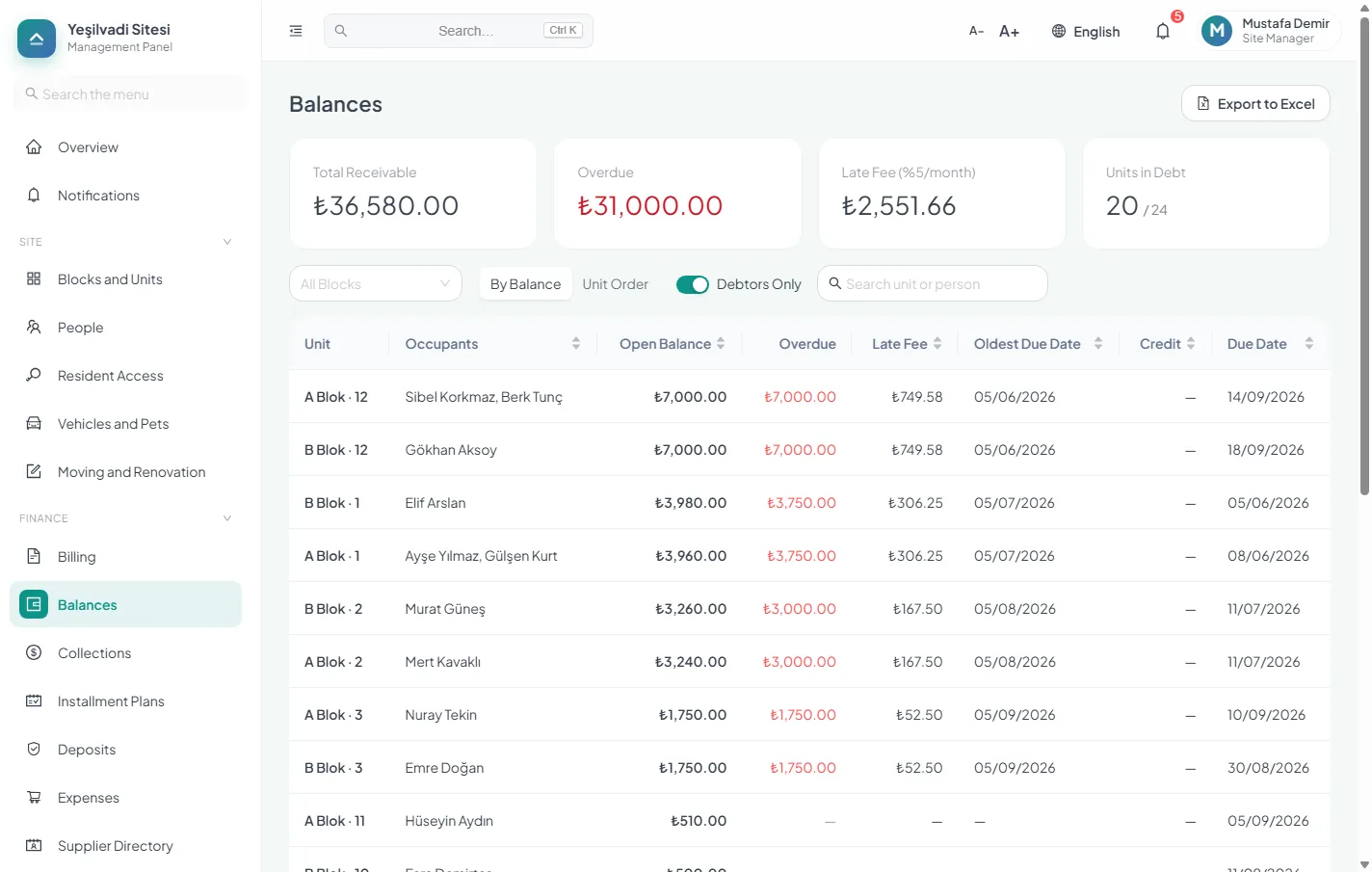
The balances screen: open debt, overdue amount, late fee and last payment date per unit
  • 32Modules, one subscription
  • ₺0Setup fee
  • 0%Commission on dues
  • 100%Your data is yours, export it whenever you want

Where did the money go? Who changed it? What does it cost?

The three questions asked most often in building management. We put the answers at the centre of the product.

Transparency

Residents see where the money goes

The income and expense statement sits in the owner’s portal, and you can open it to tenants too. Every charge shows the ratio and the unit it was calculated from. When a period closes, its records are locked and the report is archived as a PDF that never changes afterwards.

Accountability

An audit trail on every action

Who changed what, and when, is on the record. Deleted charges, corrected payments, edited expenses — all of it leaves a trace. When an auditor arrives, nothing needs hunting down. When management changes, the handover wizard passes control to the new manager with password confirmation; the history stays where it is.

Honest pricing

No hidden commission

Residents pay dues straight into the building’s own bank account with a unit payment code; we take no cut. When card payments are added, the processing fee will be shown on a separate line before the resident pays, never buried in the amount. Our own pricing is published on this page; you work out your total yourself, without asking us.

What the resident sees. Personal balances stay private; the building-wide figures are open to owners, and you can open them to tenants too.

The journey of one payment

Follow a single ₺7,000 dues payment from the charge to the frozen report. At every step it is clear who does what and who sees what.

  1. Manager

    Raises the charge

    Dues are applied to every unit in one go. Each unit’s share is calculated by land share, floor area or an equal split, and the calculation stays on record.

  2. Resident

    Sees the charge on their phone

    A notification arrives. The screen shows which item the charge comes from, the ratio used and the due date, along with the unit’s fixed payment code.

  3. Resident

    Transfers to the building’s account

    They put the payment code in the transfer description. The money goes straight into the building’s own bank account; we are not in the middle and take no cut.

  4. System

    Suggests a unit for each transfer

    The manager uploads the bank statement. The system reads the payment code, IBAN, sender name and amount and suggests a unit for each transfer; the manager approves the suggestions, and anything unmatched stays on a separate list.

  5. Everyone

    Receipt issued, statement updated

    The collection is recorded with a receipt number and the resident’s charge is closed. The amount flows into the income and expense statement the owners can see; personal balances are never shared.

  6. Auditor

    Period closes, report is frozen

    The manager closes the period; its records are locked and the report is archived as a PDF that never changes afterwards. Only a manager with full rights can reopen a period, and only with a stated reason; the reopening and the old and new values of every corrected record stay in the audit log.

Who is it for?

One product, four different needs. Each starts the job somewhere else.

Building manager

Carrying one building alone

Collect dues, document expenses, account to residents. Import units and people from Excel in an afternoon and issue the first charge run the same day.

  • Bulk import from Excel
  • Collection by payment code
  • Resident portal
  • Period close and PDF archive

Management company

Running every building in a portfolio

Hold unlimited buildings under one account. The subscription is calculated across the whole portfolio, so there is no separate contract per building. Staff, payroll and bank reconciliation run from one place.

  • Many buildings, one account
  • Portfolio-based pricing
  • Roles and permissions
  • Audit trail

Unit owner

Asking where the money went

The income and expense statement and the reports of closed periods sit openly in the owner’s portal. When a period closes its report is frozen; if the period is reopened, the reason and who reopened it are recorded.

  • Open income and expense
  • Frozen period report
  • Item-by-item balance
  • Personal balances stay private

Auditor

Checking the books from the records

The manager gives the auditor a read-only role. The auditor sees collections, expenses, bank transactions and documents in full but cannot change a single record. Every change stays in the audit trail with its old and new value.

  • Read-only auditor role
  • Field-level audit trail
  • Receipt and document archive
  • Auditor report in the meeting file

Collections

Bank statements arrive with unit suggestions

Upload the statement and it suggests a unit for each line using the payment code, IBAN, sender name and amount, and you approve them in bulk. If you like, exact matches, such as transfers carrying a payment code, are posted automatically. Anything it cannot place is listed separately for one-click manual matching. Short payments leave the remainder open; overpayments roll into the next period.

  • A fixed payment code per unit
  • Partial payments, overpayments and carry-over
  • Bulk collection: record several units’ payments on one screen
  • Every charge line in one list: paid, pending, overdue, partial, exempt
  • Instalment plans and promise-to-pay tracking
  • Deposits: intake, offset and refund
  • Late-payment charge rules you define; no charge accrues while a debt is disputed
  • Staged payment reminders with a message cost forecast
  • Clearance letter for units with a settled balance

Condominium law

General assemblies and the decision book, for real

The part most competitors skip. Prepare the agenda, let the system send the notice, record attendance and proxies, and the quorum is calculated for you. Decisions land in the decision book, linked to the agenda item they belong to.

  • Meeting notice, agenda and attendance list
  • Proxy voting and quorum by land share
  • Decision book linked to agenda items, each decision as a PDF
  • General assembly file with the auditor’s report in a single PDF
  • Operating budget with actual-versus-plan tracking
  • Monthly period summary: charged, collected, outstanding
  • House rules for residents, staff or everyone
  • Grouped chart of accounts with subtotalled income and expense
  • Dues multiplier for shops and offices

Bills and printouts

No missed bills, no hand-written notice boards

Record electricity, water and gas bills as expenses and get reminded before the due date and on the day. Upload the e-Archive PDF or e-Invoice XML and the amount and due date are read for you, on our own servers; your bill is never sent to another service. Doorbell panels, lift lists and posters come ready from the Print Center in one click.

  • Due-date reminders and overdue bill alerts
  • Late-payment fees recorded against the bill
  • Amount and due date read from e-Archive PDFs and e-Invoice XML
  • Doorbell panel and lift list; residents who opt out are left off
  • Meeting notices, announcements, house rules and emergency number posters
  • PDF, Word and Excel on A5, A4 or A3 paper
  • Excel and PDF reports in Turkish or English; official documents stay in Turkish

Staff

Payroll, severance and notice pay

A complete staff module for buildings that employ caretakers. Pro-rated payroll, annual leave balances, and severance and notice calculations on termination. Paid payroll is recorded as an expense and shows up as the actual figure on the operating budget line linked to that expense category.

  • Pro-rated payroll and timesheets
  • Annual leave balance and usage
  • Severance, notice and unused leave on exit
  • Task assignment and follow-up
  • Task completion by scanning an on-site QR code, with an optional photo

Residents

Residents find out without calling anyone

They sign in from a phone and see their balance, payment history and announcements, and owners also see the income and expense statement. They raise issues with a photo and follow the progress. The manager’s phone rings a lot less.

  • Balance, payment history and receipts
  • Issue reports with photos
  • Announcements, voting and optionally anonymous surveys
  • “I have read this” confirmation on important announcements
  • Email fallback when a push notification cannot be delivered
  • Shared-area reservations
  • Visitor and parcel log
  • Vehicles, pets and lost property

Operations

The maintenance calendar reminds itself

From periodic lift inspections to fire extinguishers, lightning-rod tests and water-tank cleaning, add ready-made maintenance templates to the calendar in one click and get reminded when each falls due. Issue reports are tracked against a target time, residents with the same problem simply say “Me too”, and they rate the work once it is done.

  • Ready-made maintenance templates, legal inspections included
  • Issue tracking with target times, merging and reopening
  • “Me too” for residents and a rating once the job is done
  • Consumables stock with low-level alerts
  • Asset inventory, supplier directory and contracts

Security and privacy

Everyone sees only what they need

Separate roles for the accountant, auditor, caretaker and board members, with optional block-level restrictions. Give the lawyer handling arrears read-only access to the units you choose, with an end date. You can require two-step verification for the whole management team.

  • Roles and permissions with block-level restrictions
  • Unit-scoped, time-limited, read-only access for lawyers
  • A separate archive for legal case documents
  • Two-step verification and session timeout
  • Personal data download and data-protection requests
  • Audit trail with old and new values per field

Migration

Coming from another system? We move the data

Import your units, people and balances from Excel. The migration wizard shows gaps and conflicts before anything is written, and duplicate-person warnings stop the same resident being created twice. You take over with opening balances intact.

  • Bulk import from Excel with templates
  • Pre-import error and conflict report
  • Duplicate person and phone warnings
  • Opening balance carry-over
  • Excel export from every list
  • All records and uploaded files in a single ZIP

From the product

Real screens from a 24-unit site. Pick a screen to see it.

Every feature

There are no plans to choose between: every module is included in every subscription. The list is read straight from the product.

Loading…

Pricing

No plans to choose from. Enter your number of units, add the messaging channels you need, and see the total and how it was calculated, line by line.

1Describe your building

Flats, shops and offices count · shared areas, storage rooms and parking do not

Quick pick

How do you get started?

Four steps from filling in the form to your first collection. We are with you at each one.

  1. Same-day reply

    Write to us

    Fill in the form or message us on WhatsApp. You have already worked out the price, so there are no surprises; we answer your questions the same day.

  2. One afternoon

    Import your lists

    Units, people and opening balances are imported from Excel. You see missing and conflicting records before the import; if you prefer, we do the import for you.

  3. Together

    Raise the first charge

    We run the first dues charge and the first bank statement matching with you: on site in Kayseri, over a video call everywhere else.

  4. No app to install

    Invite the residents

    Residents receive a bulk invitation by email. They click the link, set a password and sign in from their phones.

Apply Now

Concrete reasons to trust us

Promises are easy. These are things that work in the product today and that you can check for yourself.

Servers in Türkiye

The application and database run on a server in Türkiye. The connection between your browser and us is encrypted.

Your data is not locked in

Download all your records in Excel and your uploaded documents in folders, as a single ZIP file, whenever you like.

A trail that cannot be erased

Every change goes into the audit log with who made it, when, and the old and new values. A closed period’s report cannot be altered.

Accounts protected in two steps

You can make two-step verification mandatory for the management team. Everyone sees only the records their role allows.

You deal with us directly

Our team is in Kayseri. You reach us directly by WhatsApp, phone and email; there is no call-centre queue.

Where your data lives, who sees it and how long it is kept →

Did you know?

Short notes from Turkish condominium law

The rules managers and owners run into most, with the article number.

Late dues carry 5% a month

An owner who pays their share of costs or advances late owes late-payment compensation calculated at five percent a month for the days of delay.

In Açık Defter: Define the late-fee rule once and it is applied to balances every month.

Condominium Law No. 634, art. 20

An empty flat still pays

An owner cannot avoid their share of costs and advances by saying the unit is unused or that they give up the common areas.

In Açık Defter: Balances for empty units appear in the same list, so none slip through.

Condominium Law No. 634, art. 20

Tenants are liable for dues too

A tenant or other occupant is jointly liable with the owner for the expense and advance share and late fees. A tenant’s liability is limited to the rent they owe, and whatever they pay is deducted from the rent.

In Açık Defter: When tenants change, each period’s charges go to the right person and deposits are tracked separately.

Condominium Law No. 634, art. 22

Unpaid dues can lead to a mortgage on the unit

If the debt cannot be collected from those jointly liable, such as a tenant, either, a statutory mortgage for the court-established debt is registered on the debtor owner’s unit in favour of the other owners, upon the written request of the manager or, if there is none, of any owner.

In Açık Defter: A per-unit balance statement is one click away as a PDF.

Condominium Law No. 634, art. 22

The general assembly meets in January

Unless the management plan sets another time, the owners’ assembly meets in the first month of every calendar year.

In Açık Defter: The general assembly module prepares the agenda, the notice and the attendance list together.

Condominium Law No. 634, art. 29

Eight units or more need a manager

Buildings with eight or more units must appoint a manager. Management can be given to one person, chosen from the owners or from outside, or to a three-person management board.

In Açık Defter: Management companies run several buildings from one account.

Condominium Law No. 634, art. 34

The owners' assembly approves the budget

Since the 2026 amendment (Law No. 7579), the operating budget becomes final when the owners' assembly approves it. A final budget counts as one of the documents listed in Article 68 of the Enforcement and Bankruptcy Law.

In Açık Defter: The budget is finalised by linking it to the approving meeting and is then locked; you can download it as a PDF any time.

Condominium Law No. 634, art. 37

Accounts are audited every three months

Unless the management plan says otherwise, the accounts are audited every three months, by an auditor or a three-person audit board chosen by the assembly.

In Açık Defter: Auditors get view-only access, and the audit trail shows who changed what and when.

Condominium Law No. 634, art. 41

Frequently asked

How long does it take to get started?

One day, if your lists are ready. You import units, people and opening balances from Excel in an afternoon and raise the first charge the same day. We can do the import for you; there is no setup fee.

How is support provided?

You reach our team directly by WhatsApp, phone and email, and we reply the same day. The panel includes a user guide that walks through every screen step by step. Setup and training are done on site in Kayseri and over a video call everywhere else.

Where is my data kept, and is it backed up?

The application and database run on a server in Türkiye. Records are encrypted and backed up every night, and restoring from backup has been tested. You can also download all your records and documents yourself as a single ZIP file at any time.

How do residents join?

You send a bulk invitation to the email addresses in your people list; each resident clicks the link and sets a password. An owner or tenant can also invite their spouse and the people they live with. There is no app to install.

What about residents who do not use a smartphone?

Nobody is left out. If you turn on the SMS channel for payment reminders, they go by SMS, which needs neither internet nor an app. You can print receipts, charge breakdowns and announcements to hand over or post on the notice board. To pay, a bank transfer with the payment code is enough, and cash payments are recorded with a receipt too.

What counts as a billable unit?

Units registered as a flat, shop or office count. Shared areas, storage rooms and parking spaces registered with the “Other” type are not billed. The calculator above uses the same rule, and we state it plainly in the contract.

Is there a free trial?

We do not run trials. Instead we publish the price on this page and impose no fixed term — if it is not working out, you leave at the end of the month.

Are there different plans?

There is one plan. Every module — bank statement matching, general assemblies, operating budget, meters and payroll included — is part of every subscription; only the number of units sets the price.

Is there a mobile app? Can residents use it on their phones?

Yes. The panel is designed for phones and can be added to the home screen like an app, with no app store download (tap “Install” on Android, or “Share → Add to Home Screen” in Safari on iPhone). Once added it opens full screen with its own icon, and announcements, dues and request updates arrive as push notifications. Updates install themselves; nobody has to do anything.

Do I keep my data?

Every list exports to Excel and period reports are archived as PDFs. From Settings, one click downloads a single ZIP with every record of your site in Excel and every uploaded document, invoice, receipt and photo in folders. If you leave, you take everything with you. We do not lock data in.

What happens when the manager changes?

The outgoing manager hands over control with the handover wizard, confirmed with their password, and can stay on as auditor or board member. Balances, payments, decisions and the audit trail all stay in place; the new manager does not start from scratch.

Do you take a commission on dues?

No. Dues go into the building’s own bank account with a payment code, and the collection is matched to the transfer; we take nothing from that amount. When card payments are added later, the processing fee will be shown on a separate line before the resident pays.

I manage several buildings. Can I run them together?

Yes. Management companies hold multiple buildings under one account; the subscription is calculated across the whole portfolio and the base fee is charged once. A user who manages several buildings sees each one’s collections, requests, maintenance and report status side by side on the My Buildings screen.

Are SMS and email charged separately?

In-app and push notifications are unlimited. Each month the subscription includes three emails per unit (at least 100); beyond that you top up with email credits. New accounts get 100 SMS as a welcome gift. After that you either buy SMS packages from the panel or connect your own SMS provider account (such as NetGsm or Verimor) and pay the provider directly. Packages are valid for 12 months, and the calculator above suggests one based on your number of units.
Shall we open the ledger?

Tell us how many units you manage and we will come back to you the same day. Migration and data transfer are on us.